
 by Ansel on Jul. 22, 2026 | NO COMMENT
Facing a wiped messaging app when you desperately need crucial information is a massive obstacle. I experienced this firsthand: I deleted Signal to free up storage, only to realize an important incoming message thread was gone. The immediate panic set in. I knew I had no readable iCloud backup, and I was terrified that encrypted apps are impossible to recover once the data vanishes. Worse, I absolutely did not want to erase my current iPhone data just to see if a historical backup might hold the missing chats.
If you deleted your app and need proof of incoming messages right now, this guide is for you. We will bypass the technical impossibilities and explore realistic, tested solutions—from extracting push notification logs to scanning unencrypted computer backups—that protect your device while helping you find what you lost.
🚨 URGENT WARNING: STOP USING YOUR IPHONE RIGHT NOW
If you deleted the Signal app, iOS immediately wiped the encrypted sandbox. Direct device scanning software cannot pull a deleted encrypted SQLite database from a live, modern iOS file system due to APFS encryption. Furthermore, downloading new apps, texting, or taking photos will overwrite your hidden system logs (like the Notification Center database)—which might be your only remaining proof of incoming messages. Put your phone down and read this guide on a separate device.
Understanding the underlying technology helps set realistic expectations for your data retrieval. A common frustration is the realization that standard Apple device backups do not automatically save your private conversations. To understand the broader backup limitation, you can first check what iCloud backup includes before assuming a deleted encrypted chat is stored in the cloud.
Signal is built fundamentally on strict privacy. Unlike standard text messages, default Apple cloud backups do not contain a readable version of your local database. The application intentionally excludes its message store from cloud synchronization. Many online sources offer misleading advice, implying you can easily bypass this. You cannot override core encrypted messaging mechanics.
Any valid procedure relies strictly on finding recoverable local artifacts, parsing the iPhone push notification database, or checking linked desktop devices. If the physical data sectors on your device are overwritten by new files, the data is permanently gone. Understanding this limitation stops you from wasting time on impossible methods.
Before attempting any procedure, you must evaluate your options carefully. Many online resources list Android-specific features (like 64-digit recovery keys) and falsely claim they work on iOS. They do not. Here is an honest comparison of available methods for Apple users to help you choose the best technique for your situation.
| Recovery Method | Success Rate | Time Cost | Technical Skill Required | Safety Risk to Current Data |
| Extracting Notification Logs (Sysdiagnose) | Medium (for incoming text proof) | Medium | Advanced | Low (Read-only extraction) |
| Checking a Linked Device (Mac/iPad) | High (if set up prior) | Low | Beginner | Low (Official App Feature) |
| Extracting an iTunes Backup via Primo | Medium | Low | Beginner | Low (Non-destructive) |
Understanding the difference between an old iTunes backup scan, notification artifacts, and linked devices is crucial. This structure empowers you to select a solution that protects your current operating system data while maximizing your chances of success. If you are unsure whether your old computer backup may contain useful app data, this article explains what iTunes backup saves and why backup extraction is different from a full restore.

Primo iPhone Data Recovery helps you scan and recover lost iPhone data from iOS devices and backups. Click Here to Free Download
Here is a critical workaround that most standard troubleshooting guides miss: incoming message previews persist temporarily in the Apple push notification database. This creates a nuanced privacy angle when dealing with a situation where the primary application database was completely wiped.
When someone sends you a text, it pings the operating system's Notification Center before locking into the encrypted app database. Even if you wipe the app entirely, the operating system retains text fragments, sender IDs, and timestamps within this hidden notification log for a short period. If you need logs for legal reference without wiping your phone, this is your best angle.
Extracting these artifacts requires generating a diagnostic log on your iPhone and parsing it on a Mac. This will not restore the conversation into a neat chat interface, but it provides the critical text snippets necessary for proof. This logic is similar to other chat recovery cases, such as trying to recover deleted WhatsApp messages without backup before local traces are overwritten.
1. Trigger the Sysdiagnose: On your iPhone, briefly press and release the Volume Up, Volume Down, and Power buttons simultaneously. You should feel a short vibration.
2. Wait for Compilation: Wait approximately 10 to 15 minutes. Your iPhone is silently compiling system logs in the background. Do not use the phone during this time.
3. Locate the File: Go to Settings > Privacy & Security > Analytics & Improvements > Analytics Data. Scroll down to find the file that begins with sysdiagnose_ followed by today's date.
4. Transfer to Mac: Tap the file, hit the Share icon, and AirDrop the .tar.gz file to your Mac.
5. Parse the Logs: Unzip the folder on your Mac. You are looking for the system_logs.logarchive file or the com.apple.pushserviced logs. Open the log archive using the macOS Console app.
6. Search for Proof: Use the search bar in the Console app to type in the name of your contact, their phone number, or fragments of the text you remember. You will often find the raw push notification payload containing the timestamp and the message snippet.
Pro Tip: iOS clears push notification logs aggressively to save space. The window of opportunity to extract these files is usually less than 24 to 48 hours. If you wait too long or continue using the phone, the logs will be overwritten.
Many guides claim you can restore iOS messages using a 64-digit local backup key. This is factually incorrect. That feature is strictly for Android devices. iOS only allows device-to-device transfers for active accounts.
However, if you previously linked your account to an iPad or the desktop application on your Mac or PC, you have a massive advantage.
Because linked devices maintain their own independent, localized message databases, deleting the app on your iPhone does not instantly delete the database on your Mac or iPad.
1. Act Fast and Disconnect: If you realize you deleted the app on your phone, immediately open your Mac or iPad and turn off its Wi-Fi/internet connection. This prevents the device from syncing with the server and potentially mirroring the deletion.
2. Open the App: Open the desktop or iPad application while offline.
3. Screenshot or Export: Browse to the missing conversation. Take screenshots or manually copy and paste the necessary text for your records.
4. Re-link Your Phone: Once you have secured the data, you can reinstall the app on your iPhone, verify your number, and re-link the devices.
Primo iPhone Data Recovery helps you scan and recover lost iPhone data from iOS devices and backups. Click Here to Free Download
If you need to get your text threads back, performing a full device reset to test old iCloud backups is highly unappealing. Before erasing your device, it is worth understanding what restoring your iPhone means, because a full restore may replace current data instead of simply letting you preview old records. To address the fear of data loss for someone who does not want to erase current iPhone data, you can use specialized extraction software—but you must understand exactly how it works.
Let’s be clear: Primo iPhone Data Recovery cannot magically pull a deleted, encrypted sandbox from your live iPhone.
However, Primo is exceptionally useful for extracting data from a pre-existing unencrypted iTunes or Finder backup on your computer, without forcing you to restore your whole phone. If you backed up your phone to your computer before deleting the app, fragments of your database may be safely stored on your hard drive.
1. Download and Install the Software
Install Primo iPhone Data Recovery on the Mac or PC where your iTunes/Finder backups are stored. Launch the program after installation.
2. Choose “Recover Data from iTunes Backup”
From the left-side menu, select the “Recover Data from iTunes Backup” mode. Do not choose the live device scan mode if your goal is to inspect an existing backup file.
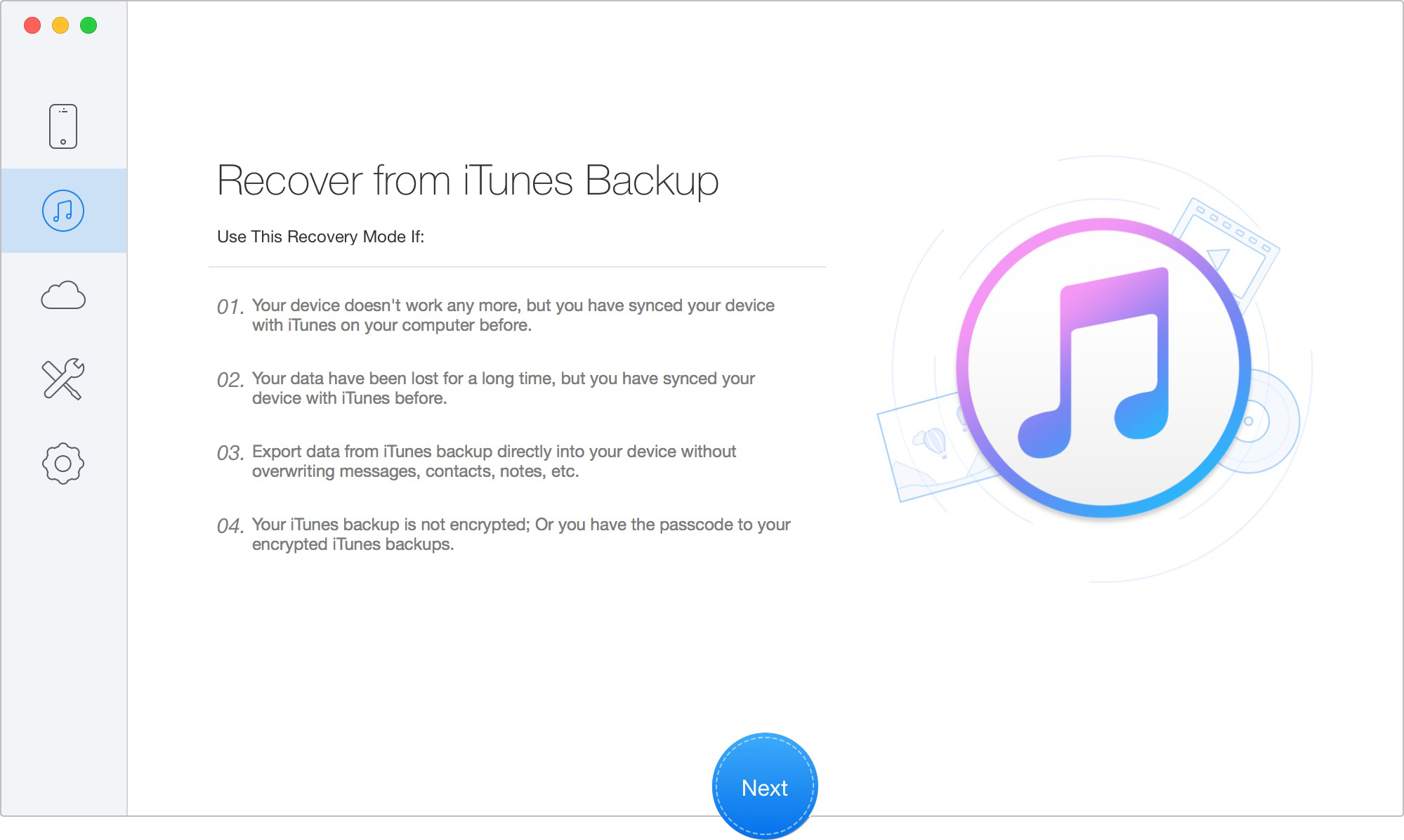
Recover Data from iTunes Backup
3. Select the Backup File to Scan
The software will automatically detect available iTunes backups on your computer. Choose the backup that may contain the historical data you need, then start the scan. You can use “Only Scan Backup” to display all data in the backup, or “Compare” to show only data that is not currently on your device.
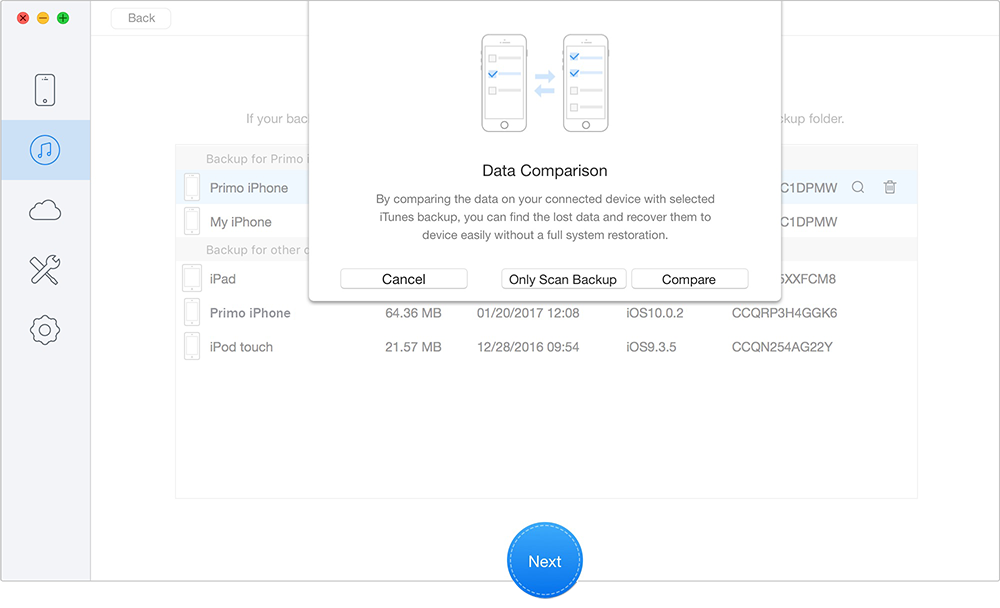
Select the Backup File to Scan
4. Analyze and Parse the Backup
Allow the tool to analyze the selected backup. This process reads the backup file stored on your computer, so it does not overwrite or modify your current iPhone data.
5. Preview the Extracted Data
After scanning, review the results by data category. You can switch between all items and deleted items, preview detailed content, and use the search box to look for contact names, timestamps, message fragments, or other specific records.
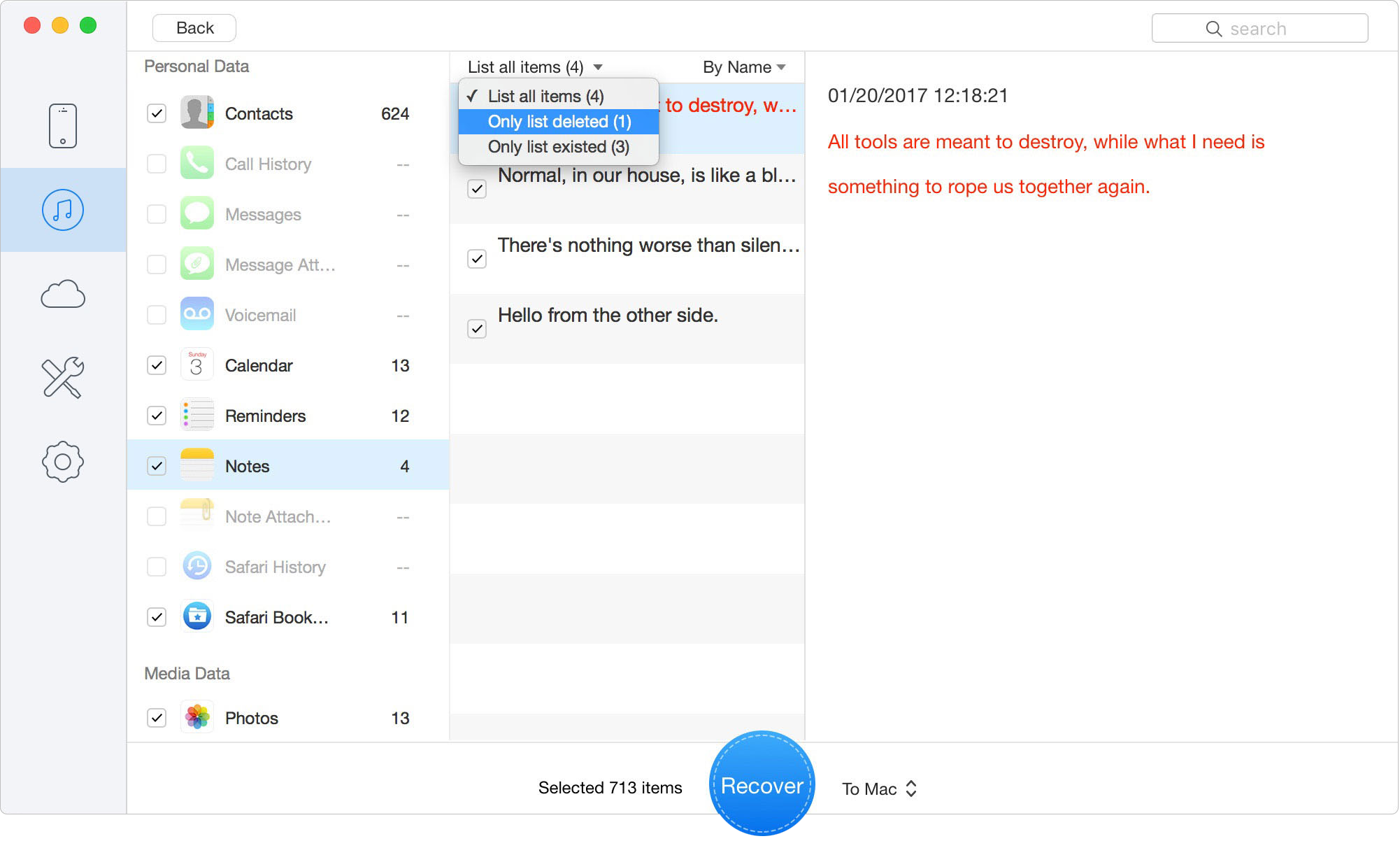
Preview the Extracted Data
6. Export the Data You Need
Select the items you want to recover, then export them to your computer. For supported personal data, you may also choose to restore it back to an iOS device if needed.
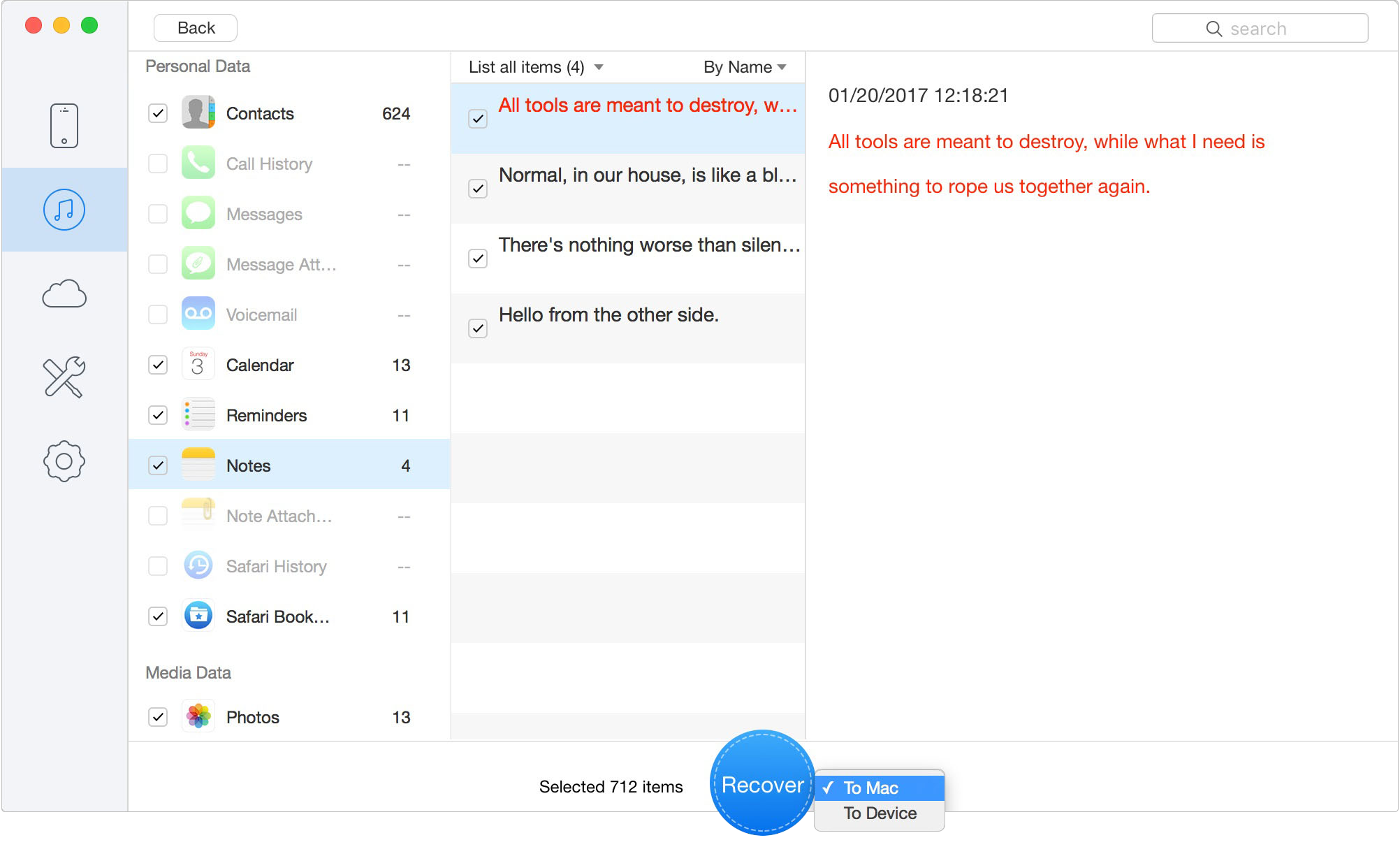
Export the Data You Need
Scanning your computer's backups and previewing the recoverable data is completely free. If you find the exact legal logs or conversations you need, exporting those records to your computer requires purchasing a paid license. This solves the problem of not wanting to erase your current iPhone data honestly and efficiently.

Designed to fit effortlessly into your iPhone data recovery.
Download NowUsers facing sudden data loss have immediate, pressing questions. Here are straightforward answers regarding encrypted messaging on Apple hardware.
Q1: Can I scan my live iPhone to recover a deleted Signal database?
No. If the app was deleted, iOS immediately wipes the encrypted sandbox. Modern APFS encryption prevents any direct device-scanning software from retrieving that specific local database.
Q2: Does Signal keep messages in iCloud?
No. The application intentionally prevents its database from syncing to iCloud to maintain optimal privacy and security.
Q3: Can I restore my iOS app using a 64-digit recovery key?
No. The 64-digit local backup recovery key is exclusively an Android feature. Apple users must rely on linked device transfers or finding unencrypted iTunes/Finder backups.
Q4: Can incoming notifications leave recoverable traces?
Yes. Incoming texts ping the Apple Notification Center before locking into the app. These temporary text snippets live in the sysdiagnose push notification logs and can be extracted if you act immediately before the system overwrites them.
Q5: What should I do before new data overwrites deleted content?
Stop using the device immediately. New data (like downloading new apps or browsing the web) will overwrite the hidden notification logs and system sectors. Apply a recovery solution like generating a sysdiagnose as soon as possible.
Losing critical conversations is incredibly stressful, especially when dealing with the strict privacy walls of encrypted messaging. As this guide demonstrates, you are not entirely out of options. While magical software won't pull deleted databases out of thin air, you can take practical, actionable steps.
Whether you generate a sysdiagnose to parse your push notification logs for legal proof, check a disconnected linked iPad, or use Primo iPhone Data Recovery to safely mine an old unencrypted iTunes backup, you can take control of the situation. Crucially, if you do not want to erase your current phone, you now have safe alternatives. Stop using your device right now to prevent overwriting hidden system files, choose the method that best matches your situation, and recover your vital information today.
Ansel A member of PrimoSync Support Team, passionate for mobile industry and ready to help you with Apple related issues.
Get Up-to-the-minute iPhone Tips & Enjoy Awesome Deals.



Design Simple and Beautiful Software
with Passion & Love

